
Generative UI in AI Overviews means Google now builds custom calculators, quizzes, and interactive layouts right inside search results. If your site ranks with a mortgage calculator, ROI estimator, or converter, Google can now build a version of it on the spot.
Here is the number that should get your attention. In Google's own research, people preferred the AI-generated interface over the top Google search result in 90% of head-to-head comparisons. That is the page you worked for years to rank, losing nine times out of ten to something a model built in seconds.
What Is Generative UI in AI Overviews?
Generative UI is Google's system for having Gemini design and code a custom interface, such as a calculator, simulation, or comparison layout, in response to a single search query. It is not a template. The model writes the tool fresh for each prompt.
The rollout happened in stages.
- ●November 2025: Generative UI launched in Google AI Mode alongside Gemini 3, according to Google Research.
- ●May 2026: At Google I/O, Google said generative UI would become free for everyone in Search that summer.
- ●August 2026: Google announced it had launched globally in English in AI Mode and started rolling out in Google AI Overviews, framed around back-to-school study tools like practice quizzes.
Scale is why this matters. Google CEO Sundar Pichai said at I/O that AI Overviews reach more than 2.5 billion monthly users and AI Mode has passed 1 billion, as reported by Search Engine Journal on August 21, 2026.
Chart: How Often Generative UI Beats Real Web Pages
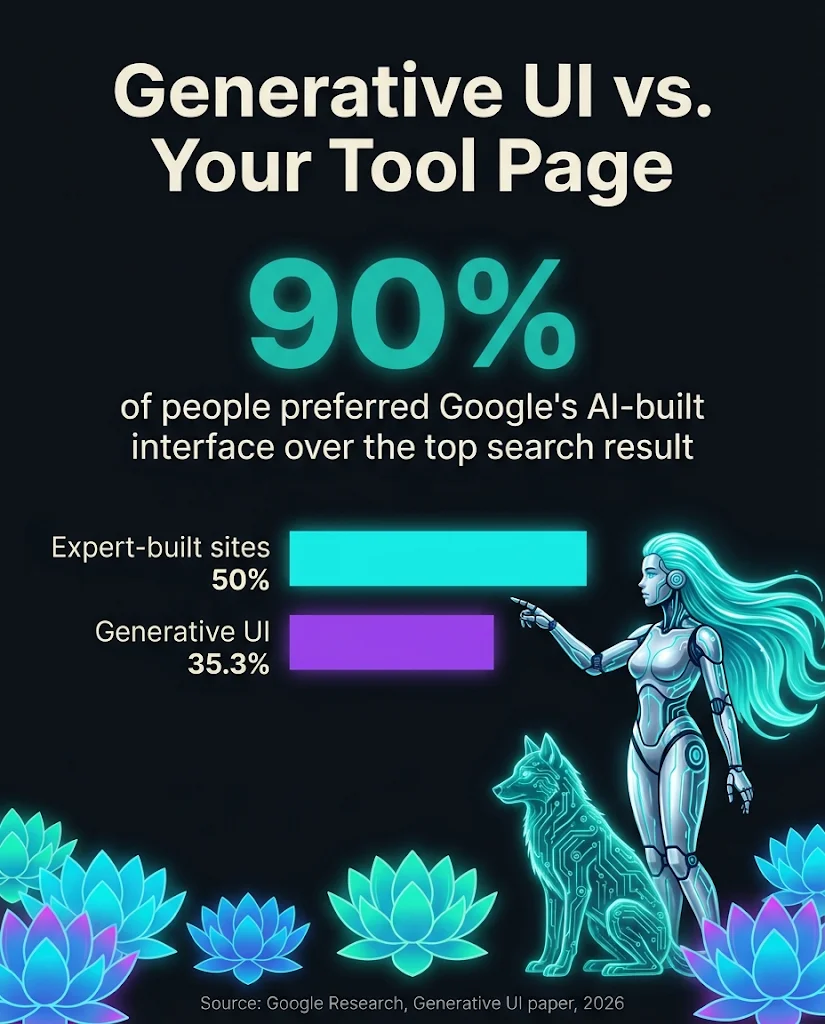
Generative UI beat the top Google result in 90% of comparisons, but expert-built custom sites still won more often than they lost.
The chart shows head-to-head preference tests from Google's research paper, published in 2026.
Data Table
| Matchup | Generative UI won | Opponent won |
|---|---|---|
| vs. top Google result, main prompt set | 90% | Not reported |
| vs. top Google result, information-seeking prompts | 73.5% | 19% |
| vs. human-built custom site | 35.3% | 50% |
Source: Google Research, "Generative UI: LLMs are Effective UI Generators" (arXiv, 2026), via Search Engine Journal, August 21, 2026.
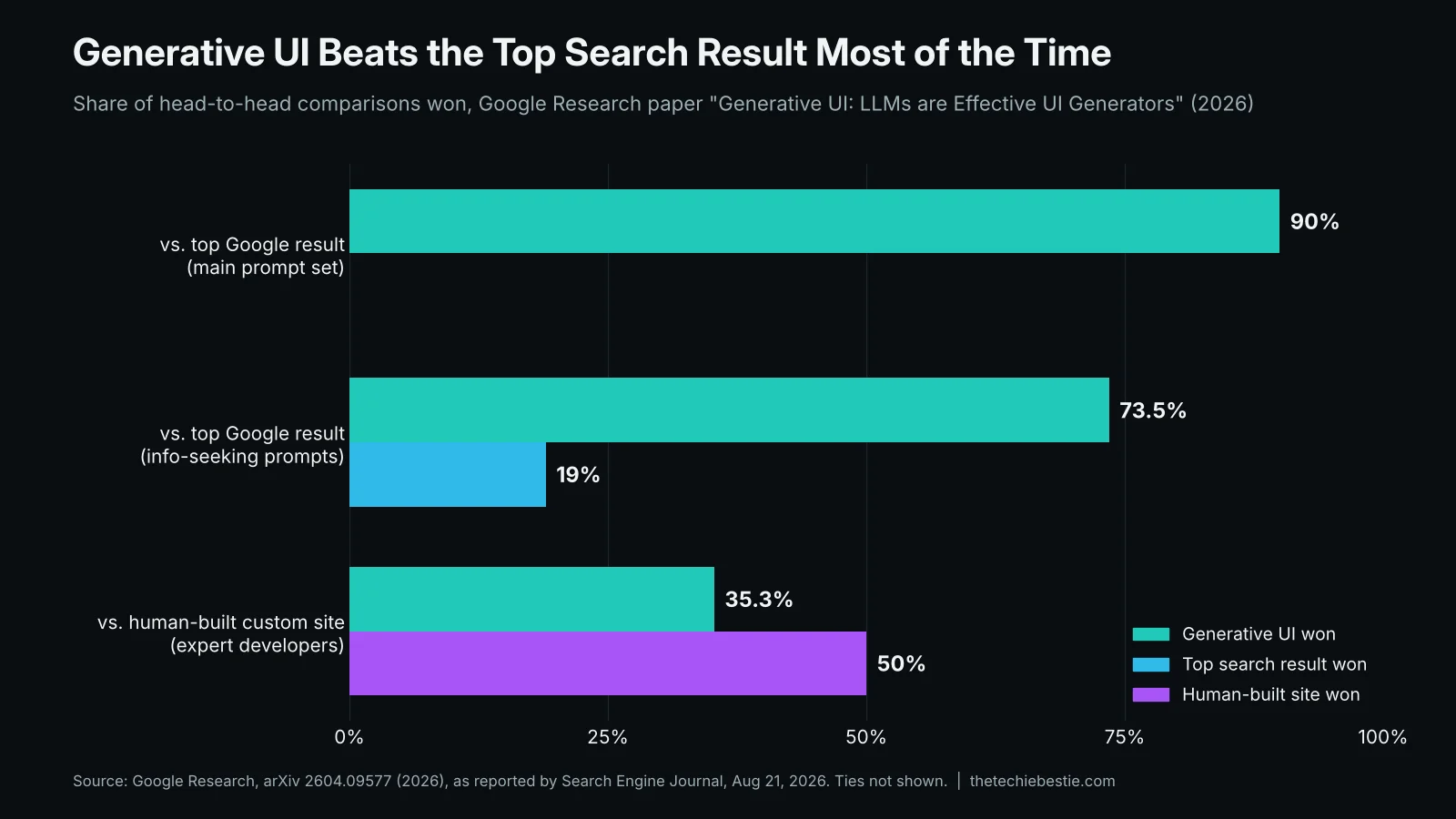
Generic tool pages lose to AI. Thoughtfully built tool pages still win.
Read that bottom row twice. The custom sites in the study were built by freelance developers paid $100 to $130 each, in about three to five hours, and told to focus on user experience. Even those quick builds beat generative UI 50% to 35.3%.
The paper also reported that the error rate on its main prompt set fell from 29% with Gemini 2.0 Flash to zero with Gemini 3. So the tools Google builds are getting more accurate, and fast.
Chart: What Happens to Clicks When AI Answers First
Visitors clicked a traditional result 8% of the time when an AI summary appeared, versus 15% without one.
This chart shows Pew Research Center's analysis of March 2025 browsing data from U.S. adults.
Data Table
| Search results page | Visits that clicked a traditional result |
|---|---|
| Without an AI summary | 15% |
| With an AI summary | 8% |
Source: Pew Research Center, July 22, 2025.
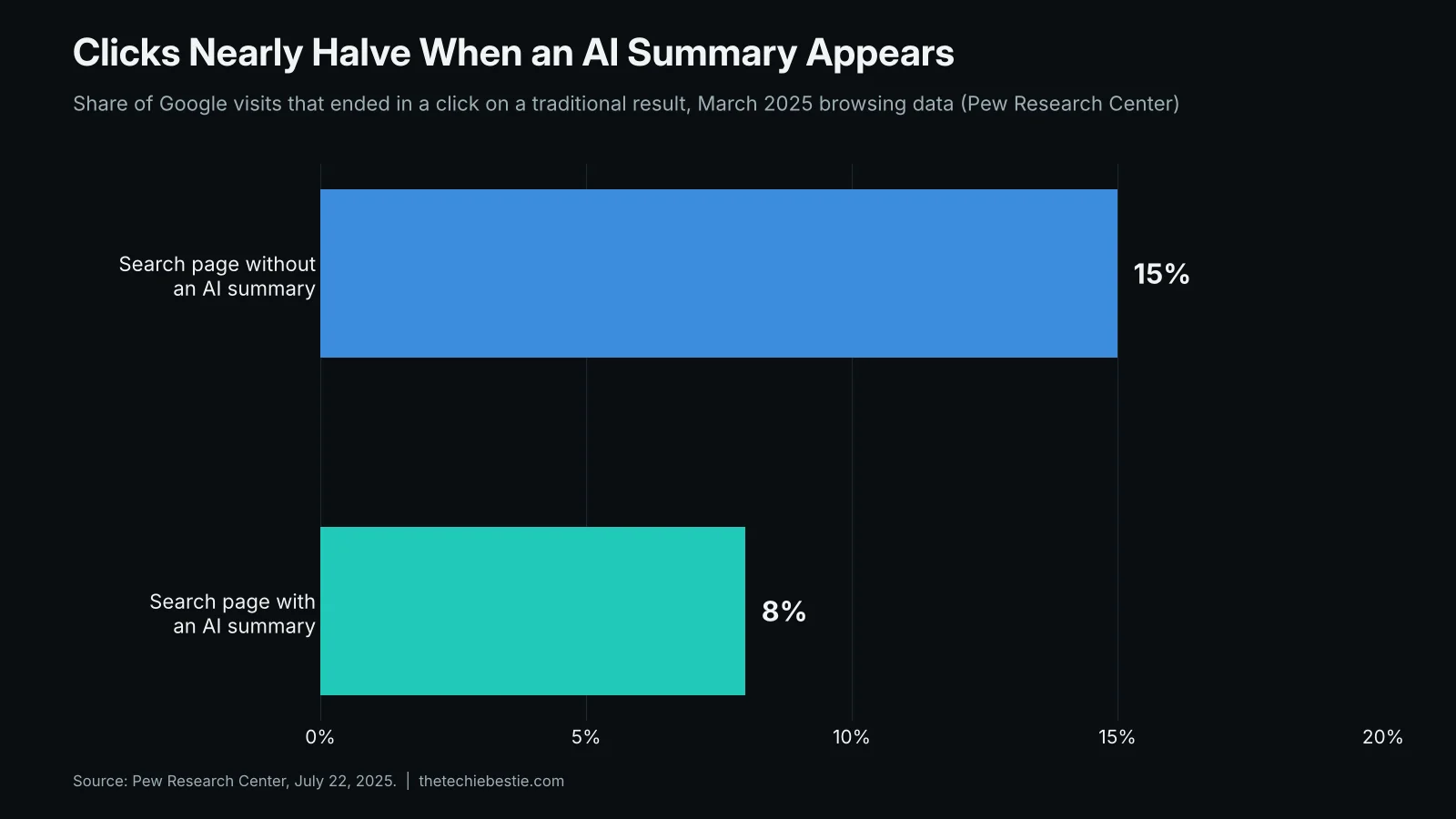
When Google answers first, half the clicks disappear. When Google builds the tool too, the click is the whole fight.
Which Tool Pages Are at Risk, by Industry
Not every calculator is in trouble. The tools easiest for a model to rebuild share three traits.
- ●Generic inputs. Loan amount, rate, and term are the same for everyone.
- ●Public math. Amortization, unit conversion, and compound interest formulas are on every textbook page.
- ●No follow-up. The user gets a number and leaves, so nothing ties the result to your business.
Tools that hold up have something the model cannot reach: your data, your pricing, your location, or your next step. Here is how that plays out for the industries I work with most.
Comparison Chart
| Industry | Tool most at risk | Upgrade that holds up |
|---|---|---|
| Mortgage and lending | Basic monthly payment calculator | Today's local rates, real closing costs, and a prequalification handoff |
| Fintech | Generic fee or FX calculator | Your actual fee schedule, live FX markup, and a saved quote |
| B2B SaaS | ROI calculator with industry averages | Benchmarks from your own customer data and an exportable business case |
| Local services | National cost estimator | ZIP code pricing, real availability, and instant booking |
I took my own advice here. When I built the ChatGPT direct traffic calculator, it used my own GA4 benchmarks, not a formula anyone could copy.

How to Protect Your Tool Pages From Generative UI in 6 Steps
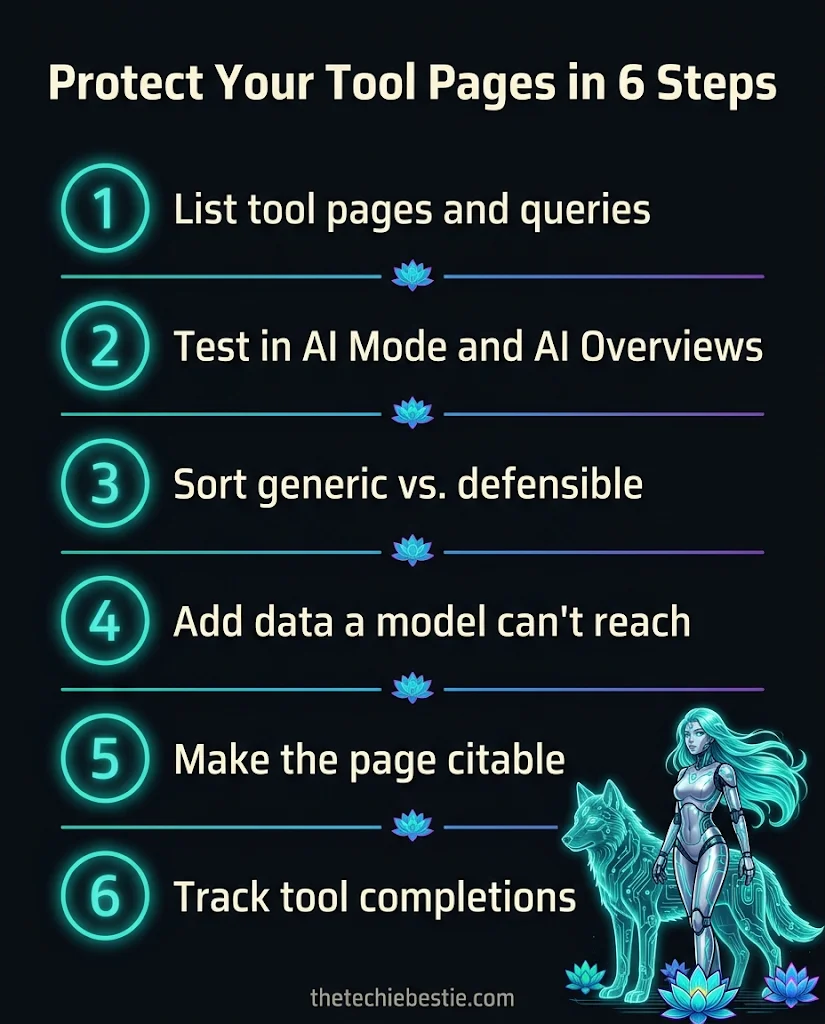
- 1.List every tool page and its queries. In Google Search Console, filter queries containing "calculator," "estimator," "converter," or "cost." Note impressions and clicks for the last 90 days.
- 2.Test those queries in AI Mode and AI Overviews. Search each one and screenshot what appears. Mark whether Google built its own tool, cited your page, or showed neither.
- 3.Sort each tool into "generic" or "defensible." If a stranger could rebuild it with public math in an afternoon, it is generic. Generic tools need an upgrade or a new job, like lead capture.
- 4.Add what a model cannot reach. Plug in proprietary data, local pricing, live rates, saved results, or a human handoff. This is the part generative UI cannot copy.
- 5.Make the page citable around the tool. Put a 40-word answer above the calculator, show the formula in plain text, add a data table, and use FAQPage and WebApplication schema. AI systems cite the page that explains the answer, not just the widget.
- 6.Measure tool completions, not just sessions. Track calculator submits as GA4 key events. If impressions hold but clicks drop, your tool is being answered in the SERP, so shift the page toward the next step.
Want help auditing your tool pages against generative UI? Book a strategy call or see packages and pricing. For the bigger picture on where Google Search is headed, read my breakdown of the Google I/O 2026 SEO and GEO debate.
Key Takeaways
- ●Generative UI now builds custom tools inside Google AI Mode and is rolling out in AI Overviews in English.
- ●Google's research found people preferred generated interfaces over the top search result 90% of the time.
- ●Expert-built custom sites still beat generative UI 50% to 35.3%, so quality tool pages can win.
- ●Generic calculators built on public math are most at risk across mortgage, fintech, SaaS, and local services.
- ●Defend tool pages with proprietary data, local pricing, citable explanations, and conversion tracking.
Frequently Asked Questions
What is generative UI in Google Search?
Generative UI is a Google Search feature where Gemini designs and codes a custom interface, such as a calculator, quiz, or comparison layout, for a specific query. It launched in Google AI Mode in November 2025 and began rolling out in AI Overviews in August 2026, starting in English.
Will Google's generative UI replace my calculator page?
It can replace generic calculators that use public math and common inputs, like basic loan payments or unit conversions. Pages with proprietary data, local pricing, live rates, or a clear next step are much harder to copy. In Google's own tests, expert-built custom sites beat generative UI 50% to 35.3%.
Which tool pages are most at risk from AI Overviews?
The most exposed tools use generic inputs, public formulas, and give users nothing to do after the result. Think basic mortgage payment calculators, currency converters, tip calculators, and ROI estimators built on industry averages. Mortgage, fintech, SaaS, and local service businesses should audit these pages first.
How do I get my calculator cited in AI Overviews?
Place a short, direct answer above the tool, explain the formula in plain text, and include a data table with real numbers. Add FAQPage and WebApplication schema. AI systems cite pages that explain an answer clearly, so the content around your calculator matters as much as the calculator itself.
Does generative UI show up for every Google search?
No. Google says AI Overviews appear dynamically and not for every search, and generative UI shows up only when Google decides an interactive layout helps. It appears most for learning, planning, and calculation queries, which is why tool pages should be tested query by query in AI Mode.