For two years, AI search performance was a black box.
You could see that AI Overviews were growing. You could watch your click-through rates fall. You could read threads on LinkedIn about what might be happening inside Google's AI systems. But you could not see which of your pages were being surfaced inside AI-generated answers, how often, or whether that visibility was growing or collapsing.
Google changed that on June 3, 2026, when it launched dedicated Generative AI Performance Reports inside Search Console, the first purpose-built view into how your content appears inside AI Overviews, AI Mode, and Discover's AI features. As of August 31, 2026, Google has now rolled out these insights to all websites worldwide.
If you have not opened Search Console in the past week, your AI visibility data is sitting there waiting for you. Here is exactly what it shows, what it does not show yet, and what to do with it.
What the Generative AI Performance Report Actually Shows
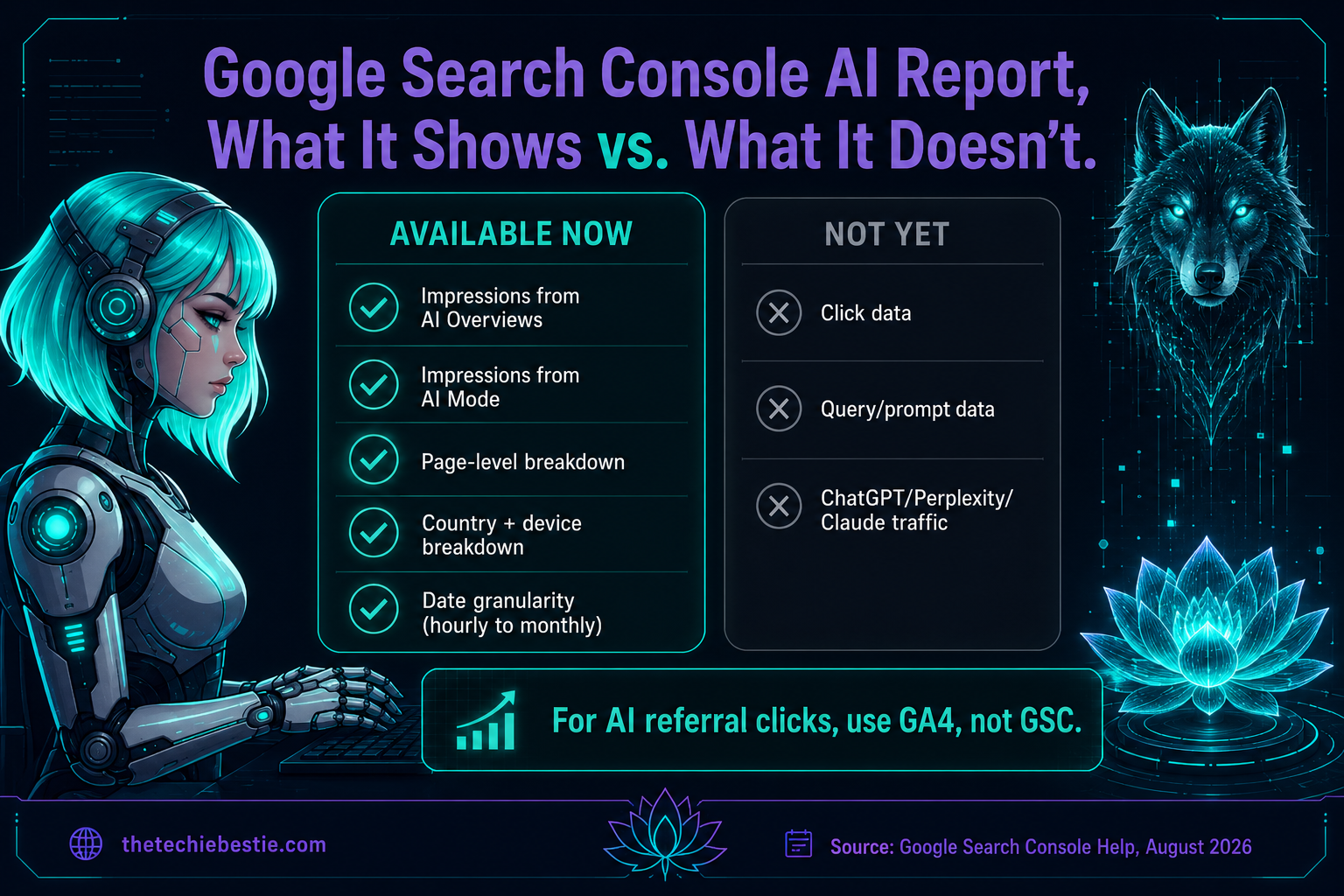
The report tracks impressions across AI Overviews, AI Mode, and AI features in Discover, broken down by pages, countries, devices, and dates. Data begins from May 18, 2026, with no historical backfill.
Located in the left-hand navigation of Search Console, directly under the familiar Performance tab, eligible property owners now have access to a dedicated menu item called Generative AI. The report covers five dimensions:
- ●Impressions, how often your URLs appeared inside AI features, not traditional organic results
- ●Pages, which specific URLs from your site were cited inside AI-generated answers
- ●Countries, geographic breakdown of your AI visibility
- ●Devices, desktop vs. mobile breakdown for Search results
- ●Dates, hourly through monthly granularity going back to May 18, 2026
Click data is not included in the current version, which is the most significant limitation. Google has indicated click data will be added, but no confirmed timeline exists. This means the report measures reach, not conversion. Pair it with your GA4 AI Assistant channel, launched May 13, for a complete picture of both impressions and the clicks that follow.
Google also released a Search generative AI control under Settings → Search generative AI, a toggle that allows sites to opt out of appearing in AI Overviews, AI Mode, and related generative AI features. Opting out does not affect rankings in standard organic search results (Senswit).
Three Ways to Actually Use This Data
Most advice about the new report tells you to look at it. Here is what to do after you look at it.
Use it as an editorial signal, not a vanity dashboard.
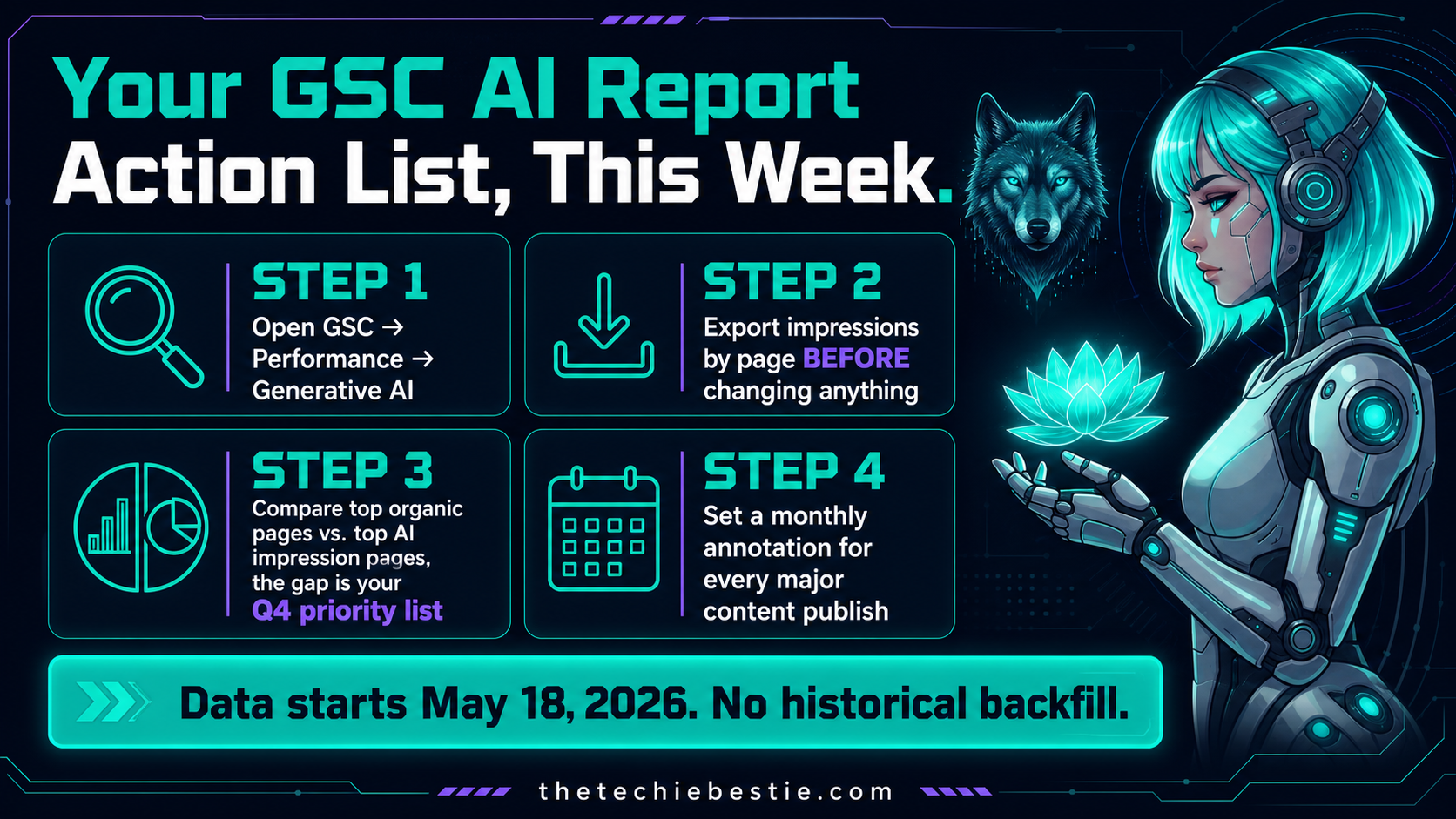
The most valuable move is comparing your AI impression data against your traditional organic performance data in the same time period. Which pages rank well in traditional search but do not appear in the AI reports? Those are your restructuring targets: pages that earn Google's trust but are not structured in a way that AI can extract and cite.
The inverse is equally important. Pages with high AI impressions but low traditional rankings are earning AI visibility through content quality and structure alone. Those pages tell you what good looks like for your domain. Replicate their format across your underperforming content.
Export your baseline before you change anything.
Export your current impression numbers by page before any content or technical changes are made. You need a before state to measure any improvement against. The report data starts May 18, 2026. There is no historical backfill. Every week you wait is baseline data you do not have.
Set a monthly annotation cadence.
Every time you publish a significant new post, restructure an existing page, or update a stat in your top content, add a note in GA4 and make a note in your GSC tracking sheet. The Generative AI report will show you whether that change moved your AI impression count. Without annotations, you cannot connect content decisions to visibility outcomes.
What the New GSC Generative AI Report Measures vs. What It Still Cannot
| Metric | Available Now | Coming Later |
|---|---|---|
| AI Overviews impressions | ✓ Yes | — |
| AI Mode impressions | ✓ Yes | — |
| Discover AI impressions | ✓ Yes | — |
| Page-level breakdown | ✓ Yes | — |
| Country breakdown | ✓ Yes | — |
| Device breakdown | ✓ Yes | — |
| Date granularity (hourly to monthly) | ✓ Yes | — |
| Click data from AI features | ✗ Not yet | Expected |
| Query/prompt data | ✗ Not yet | Expected |
| ChatGPT, Perplexity, Claude traffic | ✗ Never (use GA4) | — |
The last row matters: Google Search Console only measures performance within Google Search. Traffic originating from ChatGPT, Perplexity, Microsoft Copilot, or Claude is AI referral traffic and needs to be tracked in GA4, where it appears as referral traffic from those platforms' domains. You need both tools running simultaneously to see the full picture.
The FAQ Rich Result Removal, What It Actually Means
On May 7, 2026, Google added a deprecation notice to its FAQ structured data developer documentation. FAQ rich results no longer appear in Google Search results. The timeline runs in three phases: May 2026, SERP rendering gone. June 2026: GSC report and Rich Results Test support gone. August 2026: Search Console API support gone.
Two overcorrected reactions have been circulating since the announcement. Both are wrong.
"Schema is dead" and "FAQ schema matters more than ever for AI search", neither of which is fully accurate.
Here is the accurate version: FAQPage is still a valid Schema.org type. Google deprecated the rich result feature, not the markup itself. The main lost benefit is expanded search-result real estate, not a direct ranking factor. FAQPage markup in your code is not banned. Other search engines and AI retrieval systems may still parse it. What is gone is the visual dropdown rendering in Google.
The practical action is small: keep useful visible FAQs and remove stale or hidden markup. Update dashboards that still track FAQ rich results. Invest in FAQ content sections that solve the reader's real intent.
Pages with FAQPage schema are reportedly 3.2 times more likely to appear in AI Overviews. The visual SERP feature is gone. The content signal for AI citation remains. Keep the markup where you have real, visible Q&A content. Remove it where it was added only to capture a SERP feature that no longer exists.
The llms.txt Myth, Officially Closed
Google's June 2026 AI Optimization Guide updated its position on llms.txt files clearly: "It's completely fine if you decide to create and maintain llms.txt files for other services or systems that use these files. Doing so won't harm, nor help, your visibility or rankings in Google Search, as Google Search ignores them."
Google also reinforced: "You don't need to create new machine-readable files, AI text files, markup, or Markdown to appear in Google Search including its generative AI features."
llms.txt is not a Google visibility signal. It may be useful for other LLM platforms and API-based AI tools. For Google AI search, it is irrelevant. Stop building content strategy around it.
ChatGPT Now Owns 92.4% of AI Referral Traffic
A July study from Previsible, published via Search Engine Land, analyzed 6.77 million LLM-driven sessions across 166 websites over 19 months. The headline number: ChatGPT now commands 92.4% of all standalone AI referral traffic, up from roughly 84% in December 2025.
This number reshapes how you should prioritize AI citation work. If your content strategy is spreading effort evenly across ChatGPT, Claude, Gemini, and Perplexity, you are spreading it wrong. ChatGPT dominates AI referral traffic by a margin that should focus your optimization efforts significantly.
The same research and the new GSC Generative AI report together create a practical framework: use GSC to measure your Google AI impression volume, use GA4 to measure your ChatGPT and multi-platform referral click volume, and use both together to build a complete picture of where your content is and is not showing up.
What This Means for Your Verticals
Fintech and AP Automation. GSC's new AI report gives you the first clean data on which fintech pages are earning AI Overviews impressions. AP automation buyers increasingly start with AI-assisted search. If your comparison pages, pricing guides, and use-case content are not showing AI impressions, they are not reaching the consideration stage for AI-assisted buyers.
B2B SaaS. AI answers are already a primary discovery layer in several B2B categories, sitting alongside and sometimes ahead of traditional search results. The GSC AI report is your first clean read on whether your SaaS content is in that discovery layer or invisible to it.
Restaurants and Local Businesses. AI Mode agentic restaurant booking has now expanded to eight more countries. Agentic restaurant booking is now subscription-free. If your restaurant client's content does not appear in local AI Overviews or AI Mode, their competitors are being booked ahead of them without a single click to their site.
Construction. The June 2026 Spam Update hit hard, with sharp organic traffic drops of 15% to 20%, and in extreme cases up to 80%, reported across SEO forums. If any construction client saw a traffic drop between June 24-26, that is the spam update. Pull the GSC data before and after June 24 to confirm.

FAQ, Google AI Search Updates, September 2026
How do I find the Generative AI report in Search Console? Sign in to Google Search Console and select your property. The Generative AI section is in the left-hand navigation, directly under the Performance tab. If you do not see it, your property may not yet have access, but Google confirmed the global rollout was completed on August 31, 2026.
Does the new GSC report show traffic from ChatGPT or Perplexity? No. Google Search Console only measures performance within Google Search. ChatGPT, Perplexity, and Claude traffic is AI referral traffic and must be tracked in GA4.
Should I remove FAQ schema now that rich results are gone? No. FAQPage is still a valid Schema.org type. Google deprecated the rich result feature, not the markup itself. Unused structured data does not affect Search. Keep the schema where you have real, visible Q&A content.
Does llms.txt improve my Google AI visibility? No. Google Search ignores llms.txt files. They do not harm or help your visibility or rankings in Google Search.
What caused the traffic drops in late June 2026? The June 2026 Spam Update rolled out June 24-26. Despite completing in just two days, the impact was more severe than typical spam updates, with organic traffic drops of 15-20% and in extreme cases up to 80% reported across SEO forums.
Can I opt my site out of appearing in AI features? Yes. Google added a Search generative AI control under Settings in Search Console. Opting out removes your content from AI Overviews, AI Mode, and related generative AI features without affecting your rankings in standard organic search results.
Your Action List This Week
Three moves, in priority order:
- ●Open GSC today and find the Generative AI report. Export your impression data by page before you change anything. That baseline is your most valuable measurement asset heading into Q4.
- ●Audit your FAQ schema. Keep it where you have real, visible Q&A content. Remove it where you added it purely to chase a SERP feature that no longer exists. Update any dashboards still tracking FAQ rich result data; that reporting is gone.
- ●Stop building strategy around llms.txt for Google. Redirect that effort toward the content signals that actually drive AI citation: front-loaded answers, named entities, consistent publishing, and third-party authority signals.
The Techie Bestie content strategy services build content systems that earn visibility in both traditional and AI search simultaneously. More breakdowns on The Techie Bestie blog. Ready to audit your AI visibility? Book a strategy call.